Enhancing Your Projects with a Decorative Vintage Corner Vector Design
There is a specific kind of elegance that only classic ornamentation can bring to a visual project. In an era dominated by minimalism and flat design, returning to intricate details can make your work stand out in a crowded digital or print landscape. A decorative vintage corner vector design serves as more than just a decorative element; it acts as a visual anchor that guides the eye and adds a layer of sophistication to whatever it touches. Whether you are framing a wedding invitation or adding a touch of class to a corporate certificate, these elements provide instant structure and style.
The appeal of vintage scrollwork lies in its versatility. Unlike complex illustrations that demand attention for themselves, corner ornaments are supportive. They frame content without overpowering it. This makes them an essential tool for designers, hobbyists, and business owners who need to elevate their materials quickly. By understanding how to integrate these vectors effectively, you can transform ordinary layouts into polished, professional pieces that resonate with audiences looking for quality and tradition.
Why Choose Vector Formats for Ornamental Details
When sourcing design assets, the file format matters just as much as the aesthetic. The primary advantage of using a vector-based asset, such as an EPS file, is scalability. Raster images like standard JPGs can become pixelated when enlarged, which is disastrous for large-format printing like banners or posters. Vectors, however, are built on mathematical paths. This means you can resize a delicate scrollwork corner from the size of a business card to the side of a building without losing a single crisp line.
Furthermore, editability is crucial for real-world application. A high-quality package typically includes files that are 100% editable and color-changeable. This allows you to match the ornament exactly to your brand guidelines or event theme. If your project requires a deep navy blue instead of black, or a soft gold instead of silver, you can adjust the RGB values instantly in software like Adobe Illustrator. This flexibility saves time and ensures consistency across all your marketing materials.
Practical Applications for Creators and Businesses
The utility of a decorative vintage corner extends far beyond simple decoration. Here is how different users can leverage these assets in realistic scenarios:
- Wedding and Event Stationery: For couples planning a classic or rustic-themed wedding, these corners are indispensable. They can frame the names of the bride and groom on invitations, menu cards, and place settings. The elegant scrollwork complements serif fonts beautifully, creating a cohesive and romantic look that feels timeless rather than trendy.
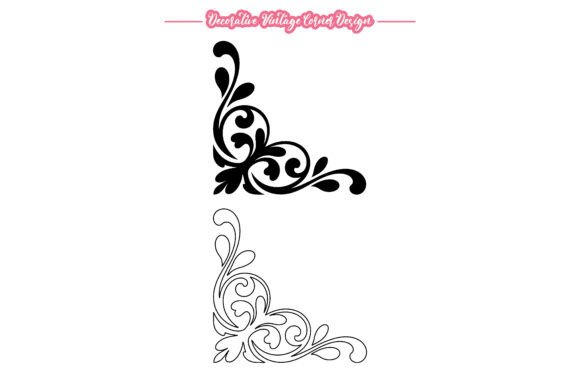
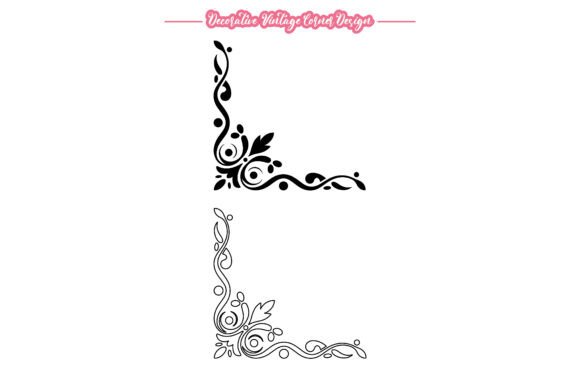
- Certificates and Awards: Educational institutions and corporate HR departments often need to produce certificates of achievement. A bare document can feel impersonal. Adding vintage corners instantly signals value and prestige. It tells the recipient that the award is significant. Because these designs are available in both solid and outline styles, you can choose a subtle outline for a modern look or a bold solid fill for traditional gravitas.
- Branding and Logos: Small businesses, particularly those in industries like law, finance, boutique retail, or artisanal foods, often benefit from a heritage aesthetic. Incorporating a vintage corner element into a logo or letterhead can suggest longevity and trustworthiness. It implies that the business has roots and respects tradition, which can be a powerful psychological trigger for customers seeking reliability.
- Scrapbooking and DIY Crafts: Hobbyists who enjoy paper crafts can use these digital files to create custom stickers, stamps, or cut-outs. With a 300 DPI resolution provided in the accompanying JPG files, the prints will be sharp and clear. This allows crafters to add professional-grade embellishments to personal photo albums, journals, or handmade greeting cards without needing advanced drawing skills.
Navigating Style and Integration
While the asset itself is beautiful, successful integration depends on context. One common mistake is overcrowding the design. Vintage corners are meant to frame, not fill. When using them in digital layouts, such as blog headers or social media graphics, ensure there is ample white space around the ornament. This breathing room allows the intricate details of the scrollwork to be appreciated rather than blending into a visual mess.
Consider the balance between solid and outline styles. Solid shapes carry more visual weight and are better suited for backgrounds with light colors or when you need the corner to act as a strong border. Outline styles, on the other hand, are airy and delicate. They work exceptionally well over photographs or textured backgrounds where a heavy shape might obscure important details. Having both options in your toolkit allows you to adapt to various design challenges seamlessly.
Technical Considerations for Best Results
Before downloading or purchasing any design asset, it is wise to check the technical specifications. For professional print work, ensure the vector file is compatible with your software. Most industry-standard programs like Adobe Illustrator, CorelDRAW, and Inkscape handle EPS files effortlessly. If you are working primarily in web design, you may need to convert the vector to SVG format for optimal loading speeds and responsiveness, though the source EPS provides the perfect foundation for this conversion.
Color mode is another critical factor. The package described offers RGB color mode, which is ideal for digital screens, websites, and email newsletters. However, if you are sending files to a professional printer for brochures or invitations, remember that printers typically use CMYK. While you can easily convert RGB vectors to CMYK in your design software, being aware of this distinction prevents unexpected color shifts in the final printed product. Always do a test print to ensure the colors remain vibrant and true to your vision.
Maximizing Value Through Versatility
The true value of a decorative vintage corner vector design lies in its reusability. Unlike a custom illustration commissioned for a single project, a versatile vector pack can serve hundreds of different needs over years. You might use the same scrollwork for a Christmas newsletter in December, a spring sale flyer in April, and a formal announcement in September. By simply changing the color and the text it frames, the element feels fresh and appropriate for each occasion.
For freelancers and agencies, having a library of such high-quality assets speeds up workflow. Instead of spending hours drawing ornate details from scratch, you can drag and drop a pre-made corner, adjust its size, and move on to higher-level creative tasks. This efficiency translates to better profit margins and faster turnaround times for clients. It is a small investment that yields significant returns in productivity and aesthetic quality.
Ultimately, design is about communication. These vintage elements communicate care, attention to detail, and a respect for classic beauty. Whether you are a teacher creating engaging worksheets, a marketer designing a premium product label, or a grandparent making a personalized birthday card, these tools help you express your intent clearly and beautifully. By choosing high-quality, editable vectors, you ensure that your final output is not just functional, but memorable.